Calculation objectives and modes: cost, vehicle count, speed and AI
Calculation objective determines which alternative to prefer. Calculation mode determines search depth. Set them independently: Quality does not make cost the priority, and Minimum vehicles does not override physical fleet constraints.
In this article
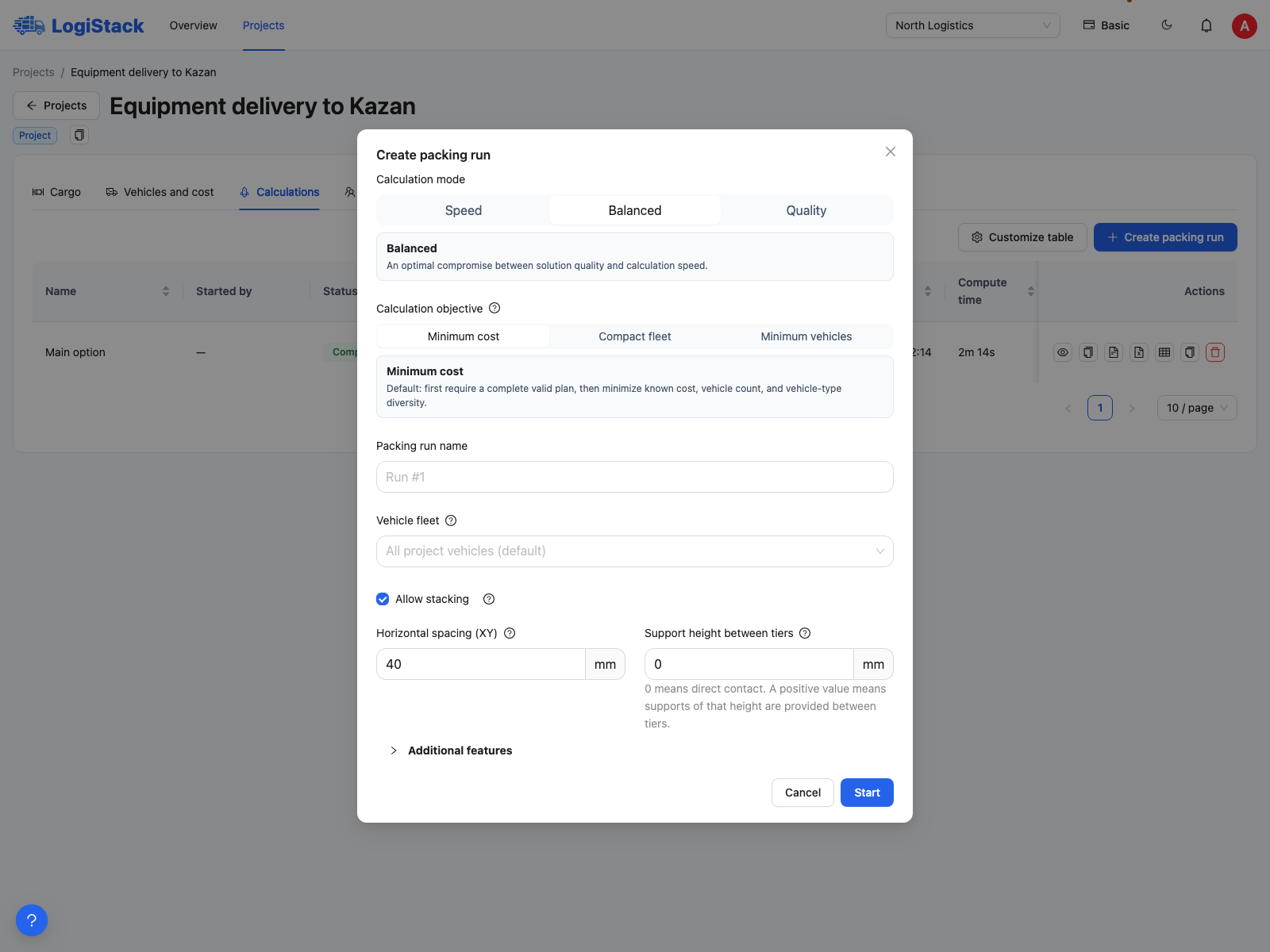
The objective sets the preferred result; the mode sets the search effort.
Choose an objective
| Objective | When to use it | What to expect |
|---|---|---|
| Minimum cost | Reduce costs using the entered prices | A complete valid plan first, then a lower cost among the alternatives found |
| Compact fleet | Reduce the vehicle count with a capped additional cost | Search for fewer vehicles costing no more than 10% above the cheapest valid alternative found |
| Minimum vehicles | Vehicle count matters more than price | A larger, more expensive vehicle may be selected |
For example, two vehicles cost RUB 40,000 together and one suitable vehicle costs RUB 50,000. Minimum vehicles may prefer one vehicle. That premium exceeds Compact fleet's 10% allowance if the RUB 40,000 plan was found and is valid. This illustrates comparison, not a promise of a particular price.
Choose a mode
- Speed — for an initial draft and frequent checks of changing conditions.
- Balanced — a standard starting point balancing time and search quality.
- Quality — a deeper search that usually takes longer.
A longer search may find another alternative but does not guarantee improvement for every shipment. Task size, vehicle types, rotations, tiers and constraints affect runtime.
Check the fleet
In the Vehicle fleet lets you select specific types. An empty selection includes all project types. The vehicle row's Available vehicles remains a physical limit. No objective allows more than the explicitly available quantity.
Additional features
Templating reduces a large list to a few suitable vehicle types before searching. This may speed up processing but exclude alternatives. If an expected type is not used, compare a calculation without templating.
AI optimisation uses AI suggestions and compares search alternatives. It does not replace actual dimensions or remove cargo constraints. Requests to modify a finished plan belong in corrections.
Axle control (beta) should be enabled after configuring axles. It adds mandatory weight-distribution checks and may change the fleet or placements.
If the cost appears incorrect
Check price per vehicle, currency, available fleet and objective. Costs use your entered quotations, not automatically sourced carrier rates. Before comparing alternatives, check whether all cargo was placed: a cheaper partial plan is not equivalent to the complete shipment.
Understanding the AI execution report
If AI is enabled and its execution summary is available, read that block separately from total transport cost. It shows proposals checked and used in the final arrangement, whether the ordinary control search completed, and changes in transport cost and vehicle count.
- Ordinary result retained: AI produced no confirmed improvement in the final plan.
- AI unavailable or response rejected: ordinary search may still be used; the whole task has not necessarily failed.
- Control search incomplete or final validation changed the result: this summary cannot confirm AI's effect.
Model spend covers AI requests; Transport cost change covers vehicle costs. These are separate amounts, possibly in different currencies. An unknown cost for some requests is not zero spend. Comparison with ordinary search does not prove a model advantage under equal computational effort.