How to review a result and select a plan
A good plan transports the required shipment under suitable conditions. The lowest displayed price is not necessarily the best option: first check that it includes all required cargo.
In this article
Check in this order
- Completeness. Compare Cargo placed and Unplaced with the shipment's piece count. A complete shipment must have no unplaced cargo.
- Fleet. Check Vehicles used and Fleet composition: which types were selected and how many of each are needed.
- Price. Check cost and currency. If the cost is only partially known, establish the missing prices first.
- Every vehicle. Open it in 3D and check placements, weight and volume utilisation, and cargo-handling rules.
- Axles and loading. Where relevant, check axle-validation status and the loading sequence.
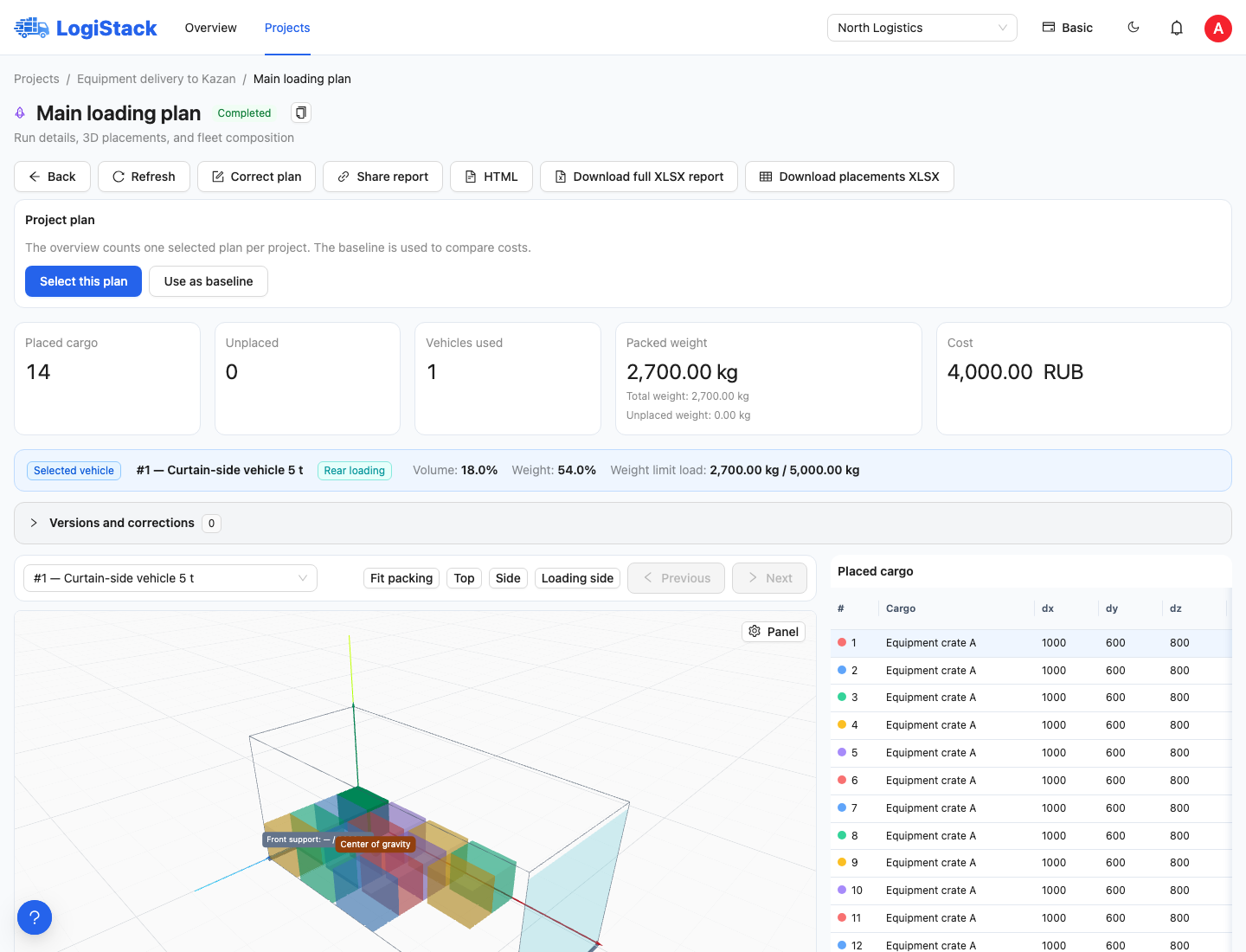
First check status, placed and unplaced counts, vehicles and cost. All 14 pieces are placed in this educational example.
Selecting the working plan
Under Project plan, click Select this plan to mark the alternative you intend to use. Other results remain in the history. Overview counts one selected plan per project, so multiple attempts are not mistaken for multiple shipments.
To change the chosen alternative, open another finished result and select it. Clear selection removes the selection, not the calculation. Accept a correction before using it as the project plan.
Comparing costs
- Open the alternative you want to compare against and click Use as baseline.
- Open your preferred alternative and click Select this plan.
- Read the cost difference or the explanation of why comparison is unavailable.
For example, a RUB 120,000 baseline and a RUB 105,000 selected plan differ by RUB 15,000. This difference applies to these two plans and your prices; it does not compare them with every carrier on the market.
Automatic comparison requires matching verified cargo and conditions, full placement in both plans, known prices and the same currency. Changed conditions may make alternatives incomparable. Do not remove part of a shipment merely to display an attractive saving.
Frequently asked questions
Why was a smaller vehicle not selected? Price, available quantities, cargo constraints and compatible placements matter as well as dimensions. Check the source fleet and objective.
Why is volume utilisation low? The weight limit may be reached before volume is filled. Stacking rules may limit height, and empty spaces may have unsuitable shapes. Read utilisation percentages alongside the scene.
Where the selected plan is used
After selecting a plan, open Overview: the summary counts one selected alternative per project, rather than every attempt. Cost comparison requires comparable baseline and selected plans; an explanation appears beside the selection if comparison is unavailable.
If a result or summary is unavailable, do not replace unknown figures with zero or select an alternative based solely on its technical status. Open the result and verify data completeness first.