How to choose loading conditions
Loading conditions are defined at three levels: each cargo item, each vehicle type and the new-calculation form. Check all three to obtain the intended plan. A global checkbox does not override an individual cargo constraint.
In this article
Where to find each setting
| What you want to change | Where to find it | What it controls |
|---|---|---|
| Cargo rotation and orientation | Cargo → Orientation | Permitted orientations of one piece |
| Whether cargo can carry a load on top | Cargo → Stacking and advanced handling | A piece's role in a stack and the load it can carry |
| Body overhang and door opening | Vehicles and cost | Placement boundaries and loading access for the vehicle type |
| Stacking, clearance and support height | New-calculation form | Global conditions for this calculation |
| What makes one alternative preferable | Calculation objective | Priority of cost or vehicle count |
| Search depth | Calculation mode | Speed, Balanced or Quality |
Your first calculation
- Save cargo and vehicles. Open Calculations and start a new calculation.
- Choose a clear name, the Minimum cost objective and Balanced mode unless you have specific priorities.
- Under Vehicle fleet, leave all types available or select those suitable for the shipment. An empty selection uses the entire project fleet.
- Check Allow stacking. Enable it only where the cargo and actual loading operations permit stacking.
- Set realistic values for Horizontal clearance (XY) and Support height between tiers. Zero is valid for both, but has different meanings.
- For axle validation, configure the vehicle axles first, then enable Axle control (beta) under Additional features.
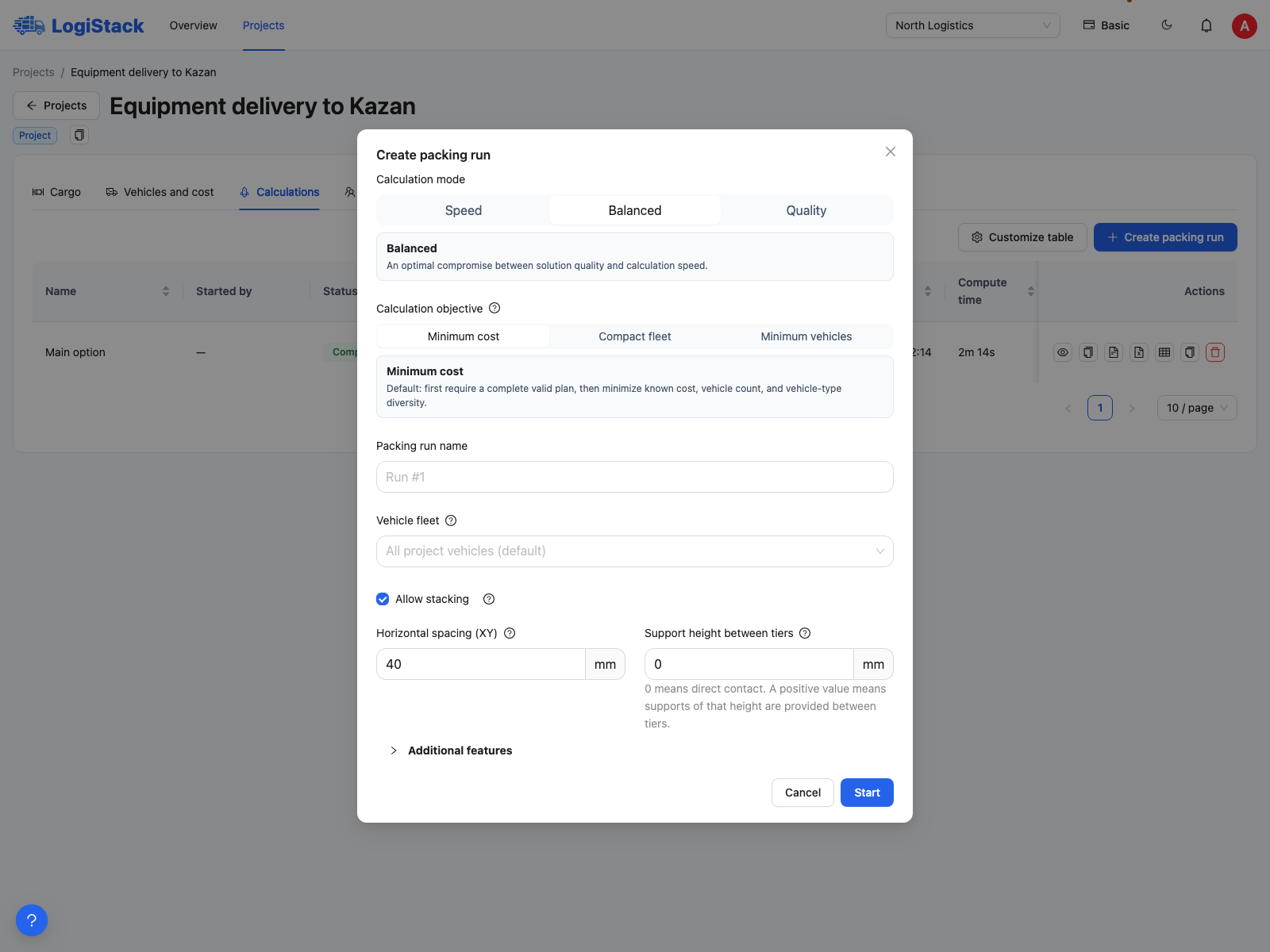
Set the main conditions in the new-calculation form.
If a new alternative is worse
Compare the conditions, not just the vehicle count. Larger clearances, a different unloading order, no top loading or a smaller fleet reduce placement options. A result may cost more because it satisfies a requirement that did not apply before.
Change one important parameter at a time and name calculations accordingly, such as “40 mm clearance” or “No stacking”. This makes differences easier to interpret. A deeper search may help, but does not guarantee improvement for every task.
If a restriction still applies
Check both the cargo row and global settings. Disabling fragility does not override a zero top-load limit; allowing stacking does not override Floor only. Recalculate after editing inputs: a saved result does not update automatically.
Details: clearances and supports, overhangs, objectives and modes.